
By Han Jong-woo | April 2026
SummitSelect.org | Tech Reviews | AI Tools | Seniors & Technology
The Bottom Line — Read This First
I’ll tell you what no tech reviewer in their 30s will tell you.
The AI features on Apple’s iPhone — bundled under the name Apple Intelligence — are genuinely useful. Some of them have changed how I use my phone in ways I didn’t expect. But several of the most hyped features are solving problems I don’t actually have, and a few of them required patience I almost didn’t give them.
I’m 71. I write books. I run a content platform. I use my phone every day for communication, research, calendar management, and staying connected with family across three time zones. I am not a casual phone user, but I am also not someone who instinctively knows where to find a new feature or what it does before I try it.
That is, I suspect, the profile of a large number of people who bought this phone or are thinking about buying it. And it is exactly the perspective that is missing from most iPhone AI reviews.
So here is my honest account — after four months of daily use — of what Apple Intelligence actually does, what it does well, what it does poorly, and whether it’s worth the price of the hardware that carries it.
Introduction: How I Ended Up Writing This Review
I didn’t set out to review the iPhone.
I bought it in December because my previous phone — an iPhone 12 — was beginning to show its age in ways that were interfering with my daily work. The camera was slower than I needed. The battery was holding about 70 percent of its original charge. And my daughter, who works in technology, told me that the gap between the 12 and the current generation was larger than my previous phone upgrades had been, specifically because of the AI features.
“It’ll actually help with what you do,” she said. She was right about some things and wrong about others.
What I’m reviewing here is not the phone in the traditional sense — camera specs, processor benchmarks, screen resolution. Those things have been reviewed extensively by people far more technically equipped than I am.
What I’m reviewing is the experience of using Apple Intelligence as an older adult who writes, communicates extensively, manages health information, and uses the phone as a practical tool rather than a status symbol or a gaming device.
That’s a specific review that I haven’t found anywhere else. So I wrote it myself.

First Impressions: The Setup Was Better Than Expected
Let me start where everything starts — the setup.
I’ve set up enough new phones to know that the process of transferring your old phone to a new one, configuring your preferences, and getting everything working the way you need it is almost always more complicated than Apple’s clean marketing suggests. Previous transfers have taken me most of a day, involved at least two calls to my daughter, and produced at least one moment of genuine panic when something I needed seemed to have disappeared.
This transfer took about two hours and went almost entirely without incident. The iPhone-to-iPhone transfer process — placing the old phone next to the new one — has clearly been refined. Almost everything moved over correctly, including my accessibility settings, which I was most concerned about.
Apple Intelligence itself is not on by default. You have to enable it in Settings. This is sensible — it’s a significant feature that should be an active choice — but it also means that many people who buy the phone may never discover it, which seems like a missed opportunity on Apple’s part.
Enabling it is straightforward. The features roll out gradually after you enable it, which initially felt strange but turned out to be practical — it meant I was encountering new capabilities one or two at a time rather than being hit with everything simultaneously.
The Features That Actually Changed How I Work
Writing Tools: This Is Where I’m Genuinely Impressed
I write a lot. Books, blog posts, emails, notes to myself that I eventually develop into something longer. Writing is central to my daily work in a way it isn’t for most iPhone users.
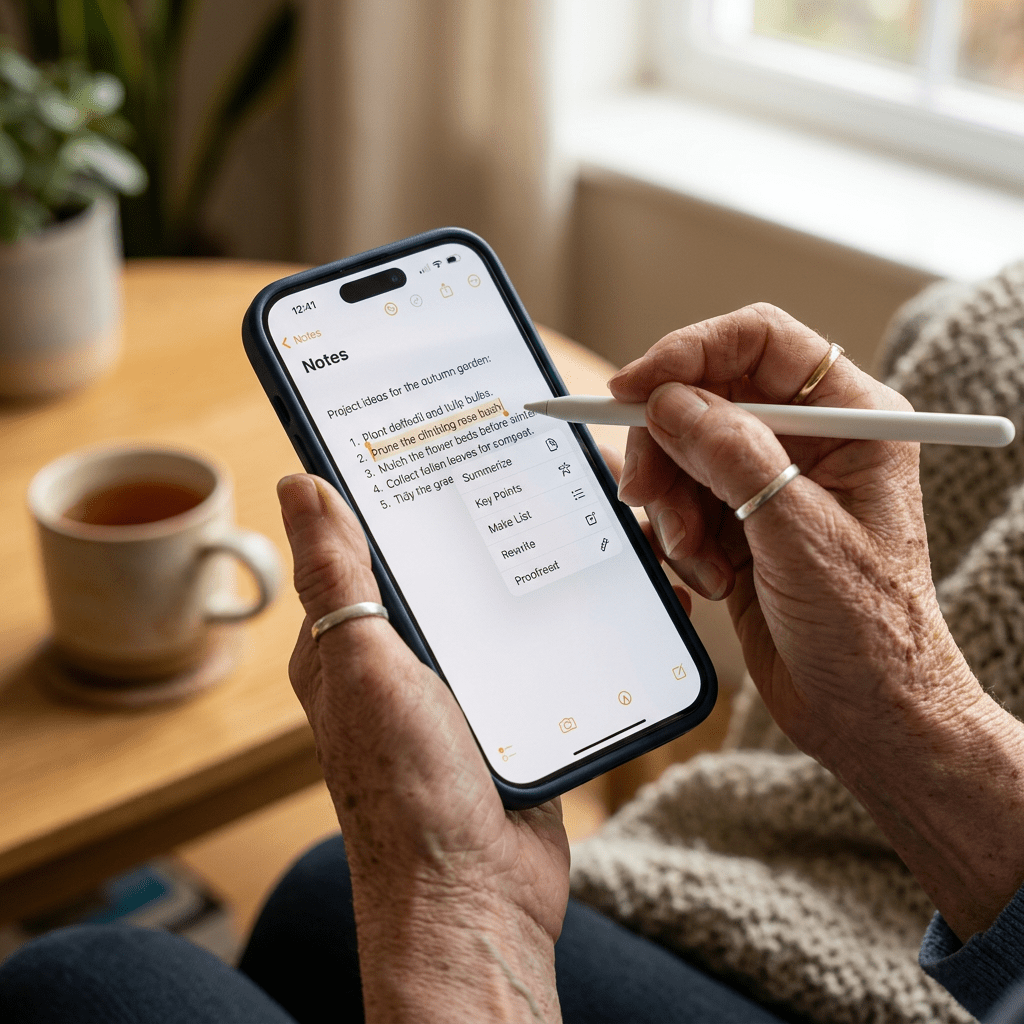
Apple Intelligence’s writing tools — accessible through a long press in any text field on the phone — have become a genuine part of my workflow.
The most useful feature is what Apple calls “Proofread.” It does what it says, but it does more than spelling and grammar checking. It catches awkward phrasing, inconsistent tone, and structural issues in the way that a good editor catches them — identifying not just errors but places where something could be clearer.
I’ve started drafting shorter pieces — blog post introductions, email responses that require particular care — directly in the Notes app and running them through the Proofread feature before I move them to my laptop for final editing. It catches things I miss at the end of a long writing session when my editing attention has degraded.
The “Rewrite” feature — which offers to rephrase selected text in different tones (more professional, more concise, more friendly) — I use less often but find occasionally valuable when I’ve written something that I can tell is wrong but can’t quite fix myself. It gives me alternatives that sometimes contain the specific word or construction I was reaching for.
What I don’t use: the “Summarize” feature. It produces summaries that are accurate but that flatten whatever was interesting about the original. For long documents you need a quick overview of, it’s probably useful. For anything with nuance that matters, it loses too much.
Siri With Intelligence: Better, But Still Not There
The upgraded Siri — the version that Apple says now has broader general knowledge and can take actions across apps — is noticeably better than the Siri I was using on my iPhone 12.
It understands more complex questions. It can carry context between follow-up questions in a way that previous Siri couldn’t. It can do things like find a specific email, add something to a calendar event, and read me the details of an upcoming appointment in a single conversational exchange.
For someone whose hands are occupied — in the kitchen, during a walk, getting into the car — this genuinely matters. The ability to manage calendar and reminders through voice, without unlocking the phone, navigating to an app, and typing, reduces a real friction point in my day.
But I want to be honest about its limitations, because the marketing here has been ambitious.
Complex requests still trip it up. Anything that involves connecting information across multiple apps in a non-standard way produces errors often enough that I’ve learned not to rely on it for anything time-sensitive. When it fails, it sometimes fails silently — claiming to have completed an action that it didn’t. I’ve learned to verify.
It is better. It is not the AI assistant the commercials suggest. Those commercials depict Siri performing extended, multi-step tasks across apps with seamless intelligence. The real Siri does these things sometimes. More often, it handles simple tasks well and struggles when requests get complex.
Mail Summaries: Surprisingly Useful
I receive a significant amount of email. Not all of it requires careful reading — but I need to know which ones do.
Apple Intelligence’s mail summary feature, which generates a one or two-line summary of each email visible in the inbox view, has genuinely changed how I process email in the morning.
I can now scan thirty emails in about four minutes, reading the summaries, and quickly identify the three that require actual attention. Previously, I would open each email, read it, close it, and move to the next — a process that took much longer and that often made email feel overwhelming before I’d even started the day’s real work.
The summaries are accurate for straightforward emails — newsletter content, appointment confirmations, shipping notifications, simple requests. They are less reliable for emails with emotional content or subtext, where the literal meaning and the actual meaning diverge. A terse email from a colleague that the AI summarizes as “following up on project status” might actually be a pointed expression of frustration that the summary completely misses.
For transactional email, the summaries work very well. For nuanced human communication, read the actual email.
The Features I Was Excited About That Disappointed Me
Priority Notifications: Good Idea, Inconsistent Execution
Apple Intelligence is supposed to surface your most important notifications at the top of your notification stack, learning over time what deserves your attention. In theory, this is exactly what I wanted.
In practice, four months in, I’m not confident the priority ranking reflects my actual priorities. It correctly surfaces messages from my family consistently. It is less reliable about identifying which work-related notifications matter and which don’t.
The system is supposed to learn. It may simply need more time than I’ve given it. But I’ve noticed I’m checking all my notifications anyway — which means the feature, for me, has not yet achieved the “only look at what matters” benefit it promises.
Image Cleanup Tool: Works As Advertised, But Not Often Needed
The ability to remove unwanted objects from photos — a background pedestrian, a shadow, an object that wandered into the frame — is technically impressive and works more reliably than any photo editing tool I’ve tried.
I’ve used it four times in four months. It’s a useful tool for those specific situations. It is not a feature I reach for regularly.
For people who take a lot of photos in complex environments — travelers, people who photograph family events where strangers wander into frames — this is probably more valuable than it has been for me.
Genmoji and Image Playground: Not For Me, Clearly Not Designed For Me
Apple’s ability to generate custom emoji and create AI images from text descriptions is technically interesting.
I have used Genmoji once, to see how it worked. I have not used Image Playground at all. These features are clearly designed for a younger demographic who communicates differently than I do. There is nothing wrong with Apple including them. They are simply irrelevant to my use case.
I mention this because I think it’s honest and because older adults considering the phone based on AI capabilities should know that a portion of what’s being marketed as “Apple Intelligence” is entertainment and social features rather than productivity tools.
The Accessibility Features: This Is Where Apple Genuinely Leads
I want to spend time on this because it’s the area where Apple’s work has the most significant impact on older adults — and the area that gets the least attention in mainstream tech reviews.
The accessibility features on the current iPhone are, in my experience, substantially better than any alternative I’ve used. Several of them are not marketed as accessibility features at all — they’re simply features that also happen to address the specific ways aging changes how we interact with technology.
Display size and visibility: The combination of larger text sizes, Dynamic Type that adjusts across apps, and the ability to increase display zoom makes the phone genuinely readable in ways that previous generations required workarounds to achieve.
Live Captions: Generating real-time captions for any audio playing on the phone — including phone calls — has been transformative for people with hearing loss. I don’t have significant hearing loss, but I’ve used it during phone calls in noisy environments where the ambient sound was overwhelming the conversation.
Voice Control: The ability to control the phone entirely by voice — not just asking Siri questions, but actually navigating the interface, typing text, and executing actions — is remarkable and largely unknown among the people who would benefit most from it.
Magnifier: The phone’s camera becomes a magnifying glass, readable at any zoom level. For menus in dim restaurants, for small print on medication bottles, for any text that the world prints in a size that seems designed to exclude people over 50 — this is immediately practical.
Background Sounds: The ability to play continuous ambient sounds — rain, ocean, white noise — to help with focus and sleep is a minor feature that has become a daily fixture in my evening routine.
These features don’t appear in the Apple Intelligence marketing materials. They are more useful to me than most of what does.

The Price Question
The honest question for anyone over 60 considering this phone is: is the AI worth the price premium over older models?
My honest answer, based on four months of use, is nuanced.
If you’re coming from an iPhone 12 or earlier, the upgrade justifies itself largely through general performance improvements — speed, camera quality, battery life — even before you factor in AI. The AI features are genuinely useful additions on top of an already significant upgrade.
If you’re coming from an iPhone 14 or 15 and specifically interested in AI, the upgrade math is harder. The writing tools are the most daily-useful AI feature, and they’re also the ones that could most plausibly be provided through a software update to older hardware. If you write a lot and use email heavily, the AI tools have clear daily-use value. If you primarily use your phone for calls, texts, and camera, the AI addition may not justify the cost difference.
The features that will likely matter most to older adults — Accessibility tools, Siri improvements, mail summaries, writing assistance — are present and genuinely useful. The features with the most impressive marketing — Genmoji, Image Playground, some of the more ambitious Siri capabilities — are either irrelevant to older users or still in the process of growing into the promise.
What I’d Tell Someone My Age Who’s Considering the Purchase
Be honest with yourself about what you use your phone for.
If you write, communicate extensively via email, manage a complex calendar, or use your phone for work that requires careful language — the AI writing and editing tools will earn their place quickly. These are genuinely good.
If you struggle with phone interfaces — if small text, navigating between apps, or remembering where features are located creates regular frustration — the accessibility improvements and the Live Captions feature alone may justify the upgrade from an older phone.
If you’re primarily interested in Siri being dramatically more capable — in having an AI assistant that handles complex multi-step requests reliably — manage your expectations. It’s better. It’s not yet as transformative as the marketing suggests.
And if someone is selling you on the Genmoji or the AI image generation features as reasons to upgrade at our age — they may be right for someone. That someone is probably not you or me.
Summary and Key Takeaways
Apple’s AI iPhone is a meaningful upgrade — particularly for older adults coming from phones more than two generations old. The AI features that matter most in daily use are the writing assistance tools, the mail summaries, and the improved Siri for simple voice-controlled tasks. The accessibility features — which are not marketed as AI but benefit enormously from the processing power that AI requires — are the category where Apple most clearly leads and where older adults benefit most specifically.
The features with the most ambitious marketing are still growing into their potential. Siri’s complex cross-app intelligence works sometimes and fails sometimes. The generative image features are impressive and largely irrelevant to most people over 60.
It is a good phone. The AI is a genuine and improving part of it. It is not yet the AI-integrated device that Apple’s commercials depict. For older adults who write, communicate heavily, and want better voice control over their devices — it’s worth serious consideration.
10 Key Tips for Older Adults Using Apple Intelligence
1. Enable Apple Intelligence deliberately, in Settings, after setup. It’s not on by default. Many people miss it entirely because they don’t know to look for it.
2. Start with the writing tools in Notes or Mail. Long press in any text field and tap the pen icon. Proofread is the most immediately useful feature and the one with the lowest learning curve.
3. Use mail summaries to triage your inbox, not to replace reading. They’re excellent for filtering what deserves attention. Read the actual email whenever tone or nuance might matter.
4. Explore the Accessibility settings fully before anything else. Settings → Accessibility. Spend an hour here. What you find will likely improve your daily phone experience more than any AI feature.
5. Enable Live Captions if you’re in situations where hearing is difficult. Settings → Accessibility → Live Captions. It works in calls, in videos, in any audio your phone produces.
6. Use Siri for simple, specific requests — not complex multi-step tasks yet. “Set a reminder for tomorrow at 9am to call Dr. Kim” works reliably. Complex cross-app requests work sometimes. Know which category your request falls into before you rely on it.
7. Try the Magnifier app immediately. It’s in your App Library or add it to your home screen. More immediately useful than most AI features for real daily situations.
8. Give the notification priority learning time. The system learns your patterns. Four months in, it’s still learning mine. Be patient — and verify important notifications regardless.
9. Don’t buy this phone primarily for Genmoji or Image Playground. If those features were described to you as reasons to upgrade, ask more questions about the features that will actually be part of your daily use.
10. If you’re upgrading from an iPhone 12 or older, upgrade for the overall performance — and think of the AI as a useful bonus. If you’re on a 14 or 15, be more specific about which AI features you’ll actually use daily before deciding the cost is justified.
Han Jong-woo is a 71-year-old author and founder of SummitSelect.org. His books on AI for older adults — including AI Made Simple for Seniors and AI and Your Health After 60 — are available on Amazon. He paid full retail price for this iPhone and received no compensation from Apple or any technology company for this review.
Tags: Apple Intelligence Review | iPhone AI Review | iPhone for Seniors | Apple AI Features | Older Adults and iPhone | Tech Review for Seniors | AI iPhone 2026
© 2026 SummitSelect.org — All Rights Reserved
It’s never too late to learn, grow, and discover new possibilities.
Explore the books of Han Jong-Woo, where artificial intelligence, lifelong learning, personal growth, and meaningful living come together to inspire your next chapter.
Whether you’re curious about AI, seeking purpose, or simply looking for fresh inspiration, you’ll find books designed to encourage, empower, and enrich your life.
▶ Visit JongWoo Han’s Amazon Author Page and discover all of his books today.


Leave a Reply